@surdeddd/bottom-sheet
@surdeddd/bottom-sheet
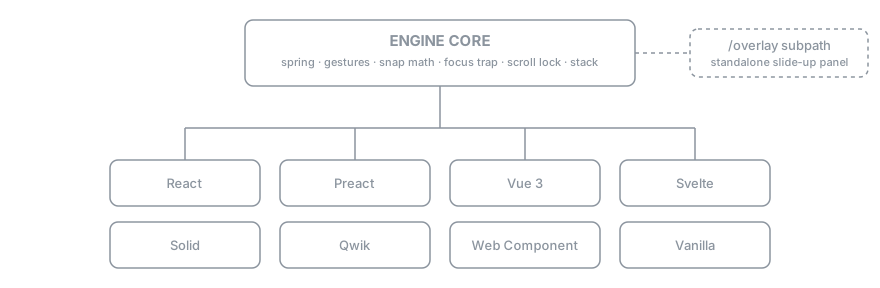
Universal, headless bottom-sheet engine. One core, eight adapters, GPU-accelerated, fully tested.





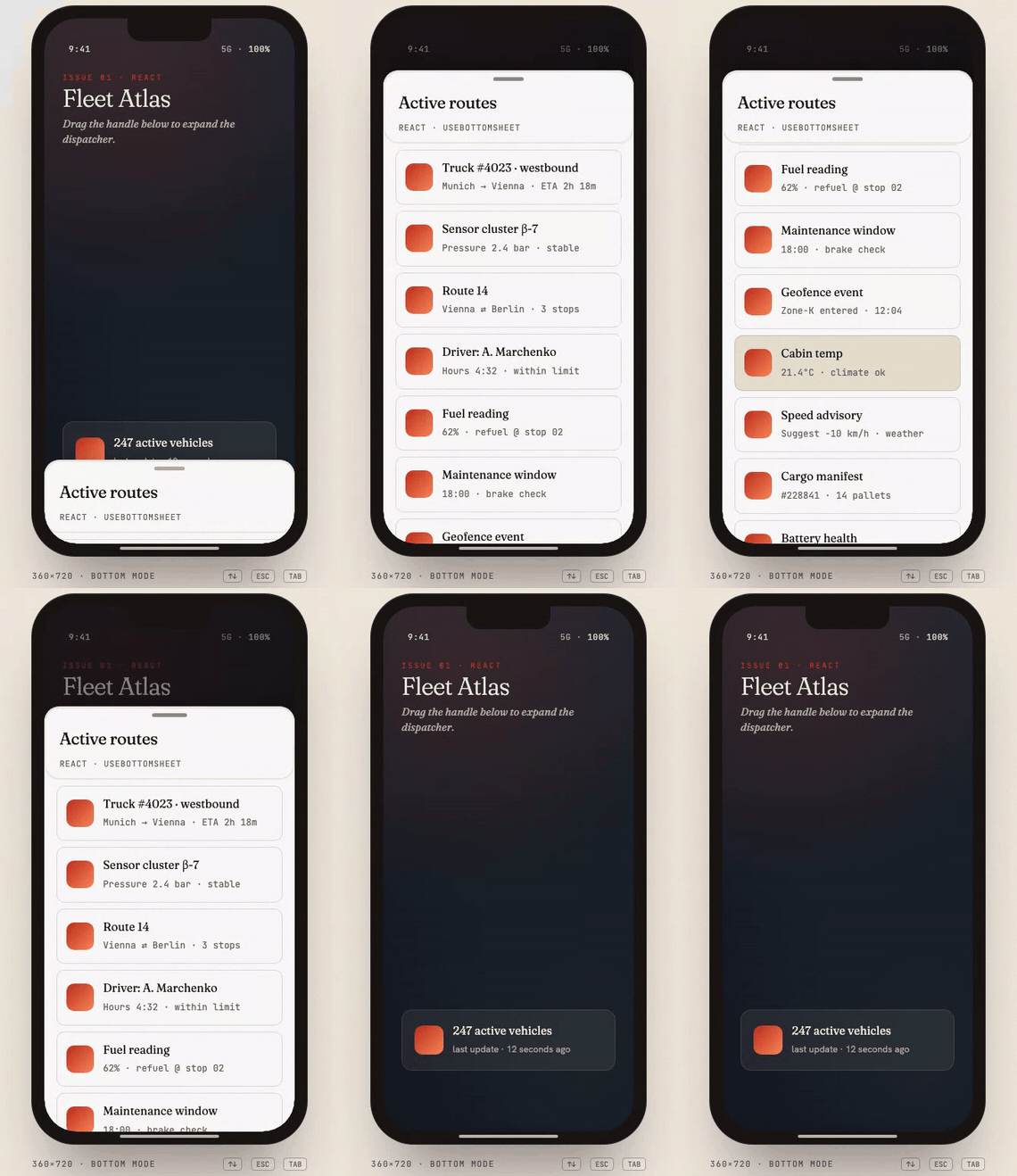
A framework-agnostic bottom-sheet primitive. Spring physics, Pointer Events, GPU-only motion, full keyboard a11y, hardware-back interception, multi-sheet stacking — and the exact same engine behind every adapter.
🚀 Live demo → bottom-sheet-demo-ashy.vercel.app
📚 API reference (typedoc) → surdeddd.github.io/BottomSheet

What it does
Every item below is verifiable in this repo's src/:
- 8 build targets — React, Preact, Vue 3, Svelte 5, Solid, Qwik, Web
Component (Lit-compatible
<bottom-sheet>) and the vanilla core, plus an/overlaysubpath (standalone slide-up panel). - 4 axes —
bottom,top,left,right(viamode). - Spring physics with velocity carry, plus pointer-type-aware tuning (separate touch / mouse / pen drag thresholds).
- Hardware-back interception on Android — opt-in via
closeOnBack. env(safe-area-inset-*)-aware padding so action rows clear the home indicator.- WCAG 2.1 AA keyboard slider — Arrow/Home/End/Esc stepping, focus trap with restore.
- Multi-sheet stacking plus a typed sheet-manager registry.
- Cancelable
before-snap/before-close— veto a transition synchronously. - Backed by 500+ unit tests across the suite and ~200 Playwright e2e runs
across three browser engines (
mobile-chrome/mobile-safari/firefox).
Install
npm i @surdeddd/bottom-sheet
React / Vue / Svelte are listed as optional peer deps — install only the framework you use, the bundle pays only for that adapter.
Quick start
React
import { BottomSheet } from '@surdeddd/bottom-sheet/react';
import '@surdeddd/bottom-sheet/styles';
<BottomSheet
snapPoints={[
{ id: 'minimized', size: 96 },
{ id: 'half', size: '45dvh' },
{ id: 'full', size: '85%' },
]}
initial='minimized'
animation='spring'
spring={{ stiffness: 260, damping: 28 }}
focusTrap
closeOnEscape
header={<h2>Search vehicles</h2>}
>
<YourList />
</BottomSheet>;
Vue 3
Search
Svelte 5
Search
Web Component (any framework)
<link rel="stylesheet" href="/styles.css" />
<script type="module" src="/element.js"></script>
<bottom-sheet
snap-points='[{"id":"min","size":96},{"id":"full","size":"85%"}]'
initial="min"
animation="spring"
focus-trap="true"
>
<h2 slot="header">Search</h2>
<ul>
...
</ul>
</bottom-sheet>
CDN — no bundler, no install
Drop-in usage from a static HTML page. The IIFE bundle registers
<bottom-sheet> as a side effect — no JS glue required.
<!-- CDN, no bundler -->
<link
rel="stylesheet"
href="https://unpkg.com/@surdeddd/bottom-sheet/dist/styles.css"
/>
<script src="https://unpkg.com/@surdeddd/bottom-sheet/dist/element.iife.global.js"></script>
<bottom-sheet
snap-points='[{"id":"min","size":96},{"id":"full","size":"85%"}]'
initial="min"
>
<h2 slot="header">Title</h2>
<p>Content</p>
</bottom-sheet>
Vanilla core (no framework)
import { BottomSheetEngine } from '@surdeddd/bottom-sheet';
import '@surdeddd/bottom-sheet/styles';
const engine = new BottomSheetEngine({
element: document.querySelector('.bs-sheet'),
handle: document.querySelector('.bs-handle'),
scrollContainer: document.querySelector('.bs-content'),
backdrop: document.querySelector('.bs-backdrop'),
snapPoints: [
{ id: 'min', size: 96 },
{ id: 'full', size: '85%' },
],
animation: 'spring',
});
engine.snapTo('full');
API at a glance
Snap points
type SnapPoint =
| number // pixels
| `${number}%` // percent of viewport along the axis
| 'fit' // natural height of the whole sheet (handle + header + content + footer)
| 'content' // alias of 'fit'
| 'full' // 100 % of axis
| string; // any CSS length — "50dvh", "clamp(200px, 60%, 800px)"
Engine options
| Option | Default | What it does |
|---|---|---|
snapPoints |
required | Ordered list of { id, size } |
allowed |
all ids | Subset the sheet may settle on right now |
initial |
first allowed | Snap id to start at |
mode |
"bottom" |
bottom, top, left, right, or logical start / end; reactive in React and Vue adapters |
animation |
"spring" |
spring, tween, ios-spring, material-bounce, linear, snappy |
settleAnimation |
off | "waapi" — settle runs as a compositor-driven Web Animation (pre-sampled spring keyframes); falls back to rAF automatically |
features |
all defaults | EngineFeature[] — override/extend the composable feature set (see Slim core below) |
spring |
snappy | { stiffness, damping, mass } |
flickVelocity |
0.65 px/ms |
Mobile flick threshold |
dragThreshold |
18 px |
Below this, drag snaps back |
rubberBand |
true |
iOS-style soft over-drag |
backdropRange |
[0, 1] |
Progress range over which backdrop fades |
screenRange |
[0, 1] |
Progress range over which the screen/scrim content fades |
focusTrap |
false |
Trap Tab focus inside the sheet when open |
initialFocus |
first field | Element / selector to focus on open; false focuses the sheet container (tabindex=-1) instead — avoids the iOS keyboard |
closeOnEscape |
true |
Listen for Escape and close |
closeOnBack |
false |
Intercept Android back button (history.popstate) |
closeOnRouteChange |
false |
Close when the URL changes (patches pushState/replaceState + popstate) |
lockBodyScroll |
true |
iOS-safe body lock (position: fixed) |
stackEffect |
false |
iOS card-stack: back sheets scale down per depth |
inertSiblings |
false |
Mark page siblings inert while open (full modal) |
persistent |
false |
Block dismissal (backdrop / Escape / back); programmatic close() still works |
disableClose |
false |
Block all closing, including programmatic |
disableDrag |
false |
Suppress the drag gesture (imperative snaps still work) |
dragFrom |
"handle" |
Which regions start a drag: "handle", "sheet" (whole sheet), or "zones" (only [data-bs-drag] subtrees). Defaults to "sheet" when no handle is given. [data-bs-no-drag] opts a subtree out in every mode. Also setDragFrom() / getDragFrom() — switching remounts the gesture, no component remount |
dragFromContent |
true |
Whether a touch gesture on the scroll container drags the sheet; override per snap point with { id, size, dragFromContent: false }. Also setDragFromContent() |
fitContentToSnap |
false |
Keeps the whole scroll container reachable and the footer on screen at every snap point, not only the largest. Off by default; see Content reachable at every snap |
radius |
token default | Corner radius (string CSS length or number px); also setRadius() |
maxHeight |
none | Cap the sheet height. number (px) or a string ("92dvh", "50%") re-resolved on viewport / orientation changes |
returnFocusTo |
opener | Focus target on dismiss — an HTMLElement, a selector string, or a () => HTMLElement factory |
Anchored elements, docked bars & scrim stages
Pin UI around the sheet — it rides the motion on the compositor (zero JS per frame) and shows/hides per state with configurable animations:
engine.addAnchor({
element: closeBtn,
position: 'sheet-top-right', // rides the sheet edge; 9 screen positions too
showOn: ['half', 'full'], // snap ids or a predicate
animation: 'pop', // fade | scale | slide | pop | custom keyframes
});
engine.addAnchor({
element: tabBar,
position: 'dock-bottom', // full-width bar; the sheet slides under it
});
engine.setScrimStages({
stages: [
{ for: 'peek', element: teaser },
{ forRange: [0.5, 1], element: expanded },
],
animation: 'fade',
});
Events
engine.on('snap', ({ id, size, progress }) => {}); // settled state change
engine.on('open', ({ id }) => {}); // 0 → >0 (enter starts)
engine.on('opened', ({ id }) => {}); // enter settled
engine.on('close', () => {}); // → 0 (exit starts)
engine.on('closed', () => {}); // exit settled
engine.on('dragstart', ({ size }) => {});
engine.on('drag', ({ size, delta }) => {}); // ~60 fps — payload is pooled, don't retain
engine.on('dragend', ({ size, velocity }) => {});
engine.on('progress', ({ value, size }) => {}); // ~60 fps
// Cancelable — call cancel() synchronously to veto the transition:
engine.on('before-snap', ({ id, size, previousId, cancel }) => {});
engine.on('before-close', ({ reason, cancel }) => {}); // reason: programmatic | backdrop | escape | back
Imperative
engine.snapTo('half');
engine.open(); // → first allowed snap with resolved size > 0
engine.close(reason?); // → first snap that resolves to size 0, else first allowed
engine.expand(); // → largest allowed snap
engine.collapse(); // → smallest allowed snap with size > 0
engine.setAllowed(ids, snapId); // dynamic allowlist
engine.setSnapPoints(points); // re-measure
engine.recompute(); // re-measure a 'fit' / 'content' snap on demand
engine.getResolvedSnaps(); // → [{ id, size }] resolved to pixels right now
engine.setPersistent(bool); // toggle persistence (block dismissal) at runtime
engine.setDisableClose(bool); // toggle close-blocking at runtime
engine.setDisableDrag(bool); // toggle the drag gesture at runtime
engine.setRadius('28px'); // corner radius
engine.setMaxHeight('92dvh'); // height cap (re-resolved on viewport change)
engine.canDismiss(); // false when persistent / disableClose
engine.isTop(); // top of the multi-sheet stack?
engine.depth(); // open sheets above this one
engine.destroy(); // remove listeners + cancel animation
initial starts the sheet born open at any snap whose size resolves > 0
(no open / opened event fires — there is no transition to announce). Calling
open() / snapTo() synchronously in the mount tick is safe — no
requestAnimationFrame / nextTick delay is needed, including fit / content
and teleported sheets. A sheet mounted hidden (display:none ancestor) heals
and emits its open sequence once on reveal. See
Architecture → Opening at construction.
Scrim runtime API
The scrim is the dim layer behind/around the sheet (screenComponent). All
scrim properties can be mutated at runtime — no remount needed.
| Method | Purpose | ||
|---|---|---|---|
| `setScrimMode('full' \ | 'above-sheet' \ | 'off')` | Switch positioning at runtime. 'off' fully disables the scrim layer. |
setScrimEnabled(boolean) |
Convenience switch — stashes/restores opacity ranges. | ||
setScrimTapToClose(boolean) |
Install/teardown click-to-close on the scrim. | ||
| `setScrimColor(color \ | null)/setScrimBlur(blur \ |
null)` | Live color & backdrop-filter blur. null clears. |
setScrimInteractive(boolean) |
Toggle pointer-events on the scrim layer. |
||
setBackdropRange([s, e]) / setScreenRange([s, e]) |
Opacity-range mapping (progress 0..1 → opacity 0..1). | ||
setScrim({ ... }) |
Batch — applies preset + individual fields in one pass with a single applySize. |
||
setScrimOverlay({ children, position, interactive }) |
Inject a positioned floating element into the scrim area. Returns a teardown. Useful for monitoring-style "dim everything except this badge" UX. | ||
getScrimState() |
Read-only { mode, enabled } snapshot. Stable public API for introspection without coupling to internals. |
Presets: 'subtle' | 'standard' | 'monitoring' | 'cinematic' — use via scrimPreset constructor option or setScrim({ preset }).
Overlay runtime API
The overlay engine (@surdeddd/bottom-sheet/overlay) is a standalone slide-up
panel that mirrors the scrim's runtime-mutability story for content.
| Method | Purpose | ||
|---|---|---|---|
| `setOverlayChildren(node \ | fragment \ | factory)` | Replace overlay contents at runtime. Pass a Node, a DocumentFragment, or a () => Node factory. |
clearOverlayChildren() |
Remove any injected content. | ||
setOverlay({ children, ... }) |
Batch update — children is one of the accepted fields alongside positioning/preset overrides. |
Presets: OverlayPreset is 'sheet' | 'dialog' | 'sidebar' | 'toast' —
exposed as the OVERLAY_PRESETS const map and accepted by setOverlay({ preset }).
Sheet manager (route-based registry)
import { createSheetManager } from "@surdeddd/bottom-sheet";
const sheets = createSheetManager<"home" | "marker" | "panorama">({
home: { snapPoints: [...], allowed: ["min", "half", "full"], onOpen: loadHome },
marker: { snapPoints: [...], allowed: ["half", "full"], onOpen: focusMarker, onClose: blur },
});
// In your route watcher:
sheets.transition(prev, next);
const cfg = sheets.resolve(currentRoute); // typed!
Performance
Three deliberate choices keep things 60 fps even on mid-range Android:
- Transform-based positioning. The sheet's
heightis set once to the largest snap; size changes apply viatransform: translate3d(...). Stays on the compositor — zero layout per frame. - Spring sub-stepping with single DOM write. Stiff springs integrate at
240 Hz internally for stability, but the engine writes to the DOM exactly
once per
requestAnimationFrame. - Settled-state-only React snapshot.
useSyncExternalStorerefreshes only onsnap/dragstart/dragend. Drag pixels and animation frames propagate via CSS variables (--bs-progress,--bs-size) and direct imperative subscriptions — no React re-renders on every frame.
Slim core & composable features
The default BottomSheetEngine ships every optional behavior preinstalled.
If you only need the essentials, import the slim core (~17.5 KB gzip vs
~23 KB) and register just the features you use:
import { BottomSheetCore } from '@surdeddd/bottom-sheet/core';
import { routeFeature, contentSwipeFeature } from '@surdeddd/bottom-sheet/features';
const engine = new BottomSheetCore({
element, handle, snapPoints,
closeOnBack: true,
features: [routeFeature(), contentSwipeFeature()],
});
Optional features: routeFeature() (closeOnBack / routedTo /
closeOnRouteChange), visualViewportFeature() (soft-keyboard clamp),
contentSwipeFeature(), persistFeature(), autoCollapseFeature().
Everything else (gestures, snap math, resize self-heal, a11y slider, focus
trap, scroll lock, scrim, stacking) is core. Setting an option whose feature
is missing dev-warns once and is ignored in production. Custom features
implement { name, install(ctx) } — the same seam the built-ins use.
WebGL renderer (opt-in)
import { webglRenderer } from '@surdeddd/bottom-sheet/webgl';
const engine = new BottomSheetEngine({
element, handle, snapPoints,
features: [webglRenderer({ jelly: 0.6 })],
});
Paints the sheet surface — panel, radii, shadow, edge sheen — on the GPU. The
moment a drag starts, the sheet's text is lifted into a texture so the whole
sheet bends as one surface, and handed straight back to the DOM once it
settles. Layout, scrolling, gestures and the accessibility tree never leave the
DOM. 4.2 KB gzip, and only if you import it.
Falls back to the DOM renderer, silently and mid-session if it has to, when
there is no WebGL, under prefers-reduced-motion, or when the browser drops
the GL context.
Debug overlay
import { attachDebugOverlay } from '@surdeddd/bottom-sheet/debug';
const detach = attachDebugOverlay(engine);
A fixed dev panel showing the active snap, live size/progress, drag/animate flags and the resolved snap list — driven purely by public engine events, shipped as its own entry so it costs nothing in app bundles.
Qwik SSR
The package declares a qwik field pointing at
dist/qwik-lib/index.qwik.mjs. Qwik apps pick the adapter up automatically
as a vendor root: the consumer optimizer segments it into QRL chunks and
renderToString emits a resumable (q:container="paused") sheet. No extra
configuration — import { BottomSheet } from '@surdeddd/bottom-sheet/qwik'
keeps working for CSR, and Qwik City SSR now works out of the box.
Theming
All visuals are driven by CSS custom properties. Override anywhere:
.bs-root {
--bs-surface: #18181b;
--bs-handle-color: #71717a;
--bs-radius: 28px;
--bs-shadow: 0 -8px 30px rgba(0, 0, 0, 0.6);
}
The engine writes --bs-progress (0..1) and --bs-size (px) to the sheet
element — drive any CSS animation from drag without touching JS:
.fab {
transform: scale(calc(1 - var(--bs-progress) * 0.3));
}
.map-canvas {
filter: blur(calc(var(--bs-progress) * 8px));
}
.search-input {
opacity: calc(1 - var(--bs-progress));
}
z-index is engine-owned. The stack controller rewrites inline
z-indexon.bs-sheet,.bs-backdropand anchor wrappers on every stack change (base100, step10per depth), so a value you set is overwritten and races the stack. To position the sheet layer against app UI, move the container (teleport target /.bs-rootparent) or change the open order — don't stylez-indexon bs-managed elements. See Architecture → z-index & the sheet stack.
Every sheet owns its backdrop. Open a list, then a detail sheet over it,
and both backdrops stay live: the dimming deepens with each level, and the
sheet underneath stays masked for the whole time the one above it closes, so
taps never reach the page mid-animation. Each backdrop follows its own sheet's
progress, so a buried sheet that closes clears its own scrim. The stack keeps
the order sheets started opening in — a sheet opened while another is still
animating stays on top. If you want a single dim level, pass backdrop={false}
(:backdrop="false" in Vue) to the sheets you open on top.
Content reachable at every snap
The sheet is always as tall as its largest snap point and is moved with a
transform; that is what keeps a drag on the compositor. The cost is that below
the largest snap the bottom of the scroll container sits under the screen edge,
by exactly largest snap − current size. At a half snap you can scroll, but the
last rows never come into view until the sheet is pulled up.
fitContentToSnap closes that gap:
<BottomSheet snapPoints={points} fitContentToSnap>
<LongList />
</BottomSheet>
When the sheet settles, the engine writes the hidden amount to
--bs-content-inset and the stylesheet shrinks .bs-content by exactly that
much, so the scroll container ends at the edge of the screen: the last row, a
focused field and the scrollbar all stay in the visible part, and the thumb is
sized for what you can actually see. The moment the sheet starts to move, it
switches to the full-height container with a spacer of the same size at the end
of the list, so the rows below the edge are already laid out when a drag or an
animation reveals them. The switch changes the box and the scroll range by the
same amount, so nothing on screen moves. That is one layout when motion starts
and one when it settles, none per frame, so the motion stays transform-only.
While the sheet moves, a list that was scrolled to its very end is held in place
on screen instead of riding up with the sheet and dropping back at the end.
The footer has the same problem and gets the same cure. It is the last thing in
the sheet, so below the largest snap it sits under the screen edge along with
the end of the list. With fitContentToSnap on, the shrunken container puts the
footer at the bottom of the visible part of the sheet at rest, and while the
sheet moves the stylesheet lifts .bs-footer by --bs-size − --bs-max-size, so
it rides that edge on every frame of a drag or an animation, still without a
layout. The list ends above it, not under it. On a snap too short to hold both,
the footer slides under the screen edge instead of covering the handle. The
WebGL renderer gets the same layout; while the sheet moves its footer paints
the surface colour, and a drag lifts the list into a texture that follows the
list's scroll position, so a list held at its end stays put there as well.
Scrolling the list at every snap on touch
Making the end of the list reachable and letting a finger scroll to it are two separate things. By default a swipe that starts on the content drags the sheet until it reaches its largest snap, and only then scrolls the list — the native sheet behaviour. On a mouse or trackpad the wheel scrolls at any snap regardless; on touch it does not. To scroll at a half snap with a finger, hand content swipes to the list and keep the handle (and header) for moving the sheet:
<BottomSheet snapPoints={points} fitContentToSnap dragFromContent={false}>
<LongList />
</BottomSheet>
dragFromContent can also be set per snap point, which keeps the native
pull-to-expand feel at a small peek and frees the list from half upwards:
const points = [
{ id: "peek", size: 120 },
{ id: "half", size: "50%", dragFromContent: false },
{ id: "full", size: "90%", dragFromContent: false },
];
It applies to bottom sheets and expects the scroll container to be the growing
child of the sheet's flex column, the way .bs-content is. For any other
container, data-bs-fit-content on the sheet reads rest or moving and
--bs-content-inset holds the hidden amount: shrink the container by it at
rest, or pad the end of its content by it while moving. On the slim core add
contentFitFeature() from @surdeddd/bottom-sheet/features.
Scrim, blur & high contrast
| Token | Default | Region |
|---|---|---|
--bs-scrim-color |
transparent | Fill of the scrim layer (.bs-screen) |
--bs-scrim-blur |
0px |
backdrop-filter: blur() applied to the scrim layer |
--bs-header-min-height |
0px |
Minimum height of the .bs-header region |
--bs-scrim-blur drives a real backdrop-filter blur on the scrim — set it
for a frosted backdrop (or use the monitoring / cinematic scrim presets,
which set both color and blur). Under Windows High Contrast / forced-colors
the stylesheet ships a @media (forced-colors: active) block so the sheet
surface, handle and focus ring stay visible.
Padding & layout
Every region's padding is a token — override or zero it to go edge-to-edge.
Defaults match the built-in look. Set the variable on the host / .bs-root /
:root; custom properties inherit through the Web Component's shadow boundary,
so the same override works for every adapter:
| Token | Default | Region |
|---|---|---|
--bs-content-padding |
0 16px 16px |
scrollable body |
--bs-handle-padding |
8px 16px 4px |
grabber strip (top) |
--bs-header-padding |
0 16px 8px |
header slot |
--bs-footer-padding |
12px 16px (+ inset) |
footer slot |
(The footer default is 12px 16px calc(12px + env(safe-area-inset-bottom)) — it
keeps action buttons clear of the home indicator.)
.bs-root { --bs-content-padding: 0; } /* full-bleed content */
.bs-root { --bs-content-padding: 0 24px 24px; } /* custom insets */
bottom-sheet { --bs-handle-padding: 0; } /* Web Component, from the host */
A maxHeight (prop, or max-height attribute on the element) caps the sheet:
a 'content' / 'fit' snap taller than the cap settles flush against the edge
and the body scrolls internally — the sheet never lifts off its anchor and
--bs-size always equals the rendered height.
Demo
npm run demo
# http://localhost:5173
The editorial demo showcases the adapters, every gesture, every mode
(bottom · top · left · right · overlay), and live engine readouts (active
snap, progress, velocity, FPS). EN/RU and light/dark toggles in the corner.
Right-to-left
left and right are physical edges and stay physical. For interfaces that
flip with the writing direction, use the logical modes — start and end
resolve against the direction that applies to the sheet, so start is the left
edge in English and the right edge in Arabic:
new BottomSheetEngine({ element, handle, mode: 'start', snapPoints });
Browser support
Baseline: Chrome/Edge 80, Safari 13.1 (iOS 13.4), Firefox 72 — set by the
ES2020 build target and the APIs the engine cannot work without (Pointer
Events, CSS custom properties, ResizeObserver). Everything else, from
inert to backdrop-filter to WebGL, is capability-checked and degrades.
Testing
npm test # 500+ unit tests via vitest + happy-dom
npx playwright test # e2e via Playwright on mobile-Chrome / mobile-Safari / Firefox
npm run typecheck # TypeScript --noEmit
CI runs all three across Node 20.19 / 22 on every PR and tag.
Contributing
npm installnpm run dev— tsup watch modenpm run demo— Vite dev server with live demonpm test— vitest watch- Open a PR with a focused diff. The CI matrix gates merging.
License
MIT — see LICENSE.